HTML in Flash Text
How to display a flash textbox with HTML formatting
You might have wondered how a textbox in flash can be formatted using HTML tags. This tutorial teaches you how to preserve rich text formatting in a flash textbox like font, font style, hyperlink, paragraph, and other text parameters, using the appropriate HTML tags.
You Are Here ::: Home >> Free Tutorials >> Flash Tutorials >> HTML TextboxFollow the steps given below:
Creating HTML Rendering Textboxes in Flash
- The Dynamic and Input textboxes can be made HTML Rendering.
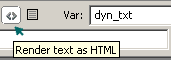
- Create a Dynamic Textbox and select 'Render text as HTML" from the Properties inspector, don't forget to enter a variable name say, 'dyn_txt'.
- To format the text in Bold/Italics, open Actions window (F9) and type the following code:
- Values can also be concatenated using '+' sign. Other HTML tags for Fonts can also be used with these Textboxes as shown below:
- Hyperlinks and Paragraphs can also be done as shown below:
dyn_txt = "<b>This text is in Bold</b><br>";
dyn_txt = "<i>This text is in Italics</i>";
dyn_txt = "<font color='#"+990000+"'><b>First line Text in Bold Red color</b><font>";
dyn_txt += "<br><font size='20'>2nd line Text with font-size 20.<font>";
dyn_txt="<br><p align='center'>Center aligned Paragraph Text in Italics</p>
<a href='http://www.smartwebby.com'><b>Smartwebby.com<b></a> to visit the site";
Software Required
Compatible Versions of Flash for this Tutorial


Flash CS5 Professional | Flash CS4 Professional
Note: For uses of lower versions of Flash some visual interface images would differ.
Recommended Version: Adobe Flash CS5 Professional