Introduction to inserting, editing & deleting records in a MySQL database table using PHPMyAdmin
In this tutorial you will learn how to insert, edit or delete records into a table using PHPMyAdmin. Once a table is successfully created, we can insert, edit or delete a record using MySQLAdmin. The following steps will explain how to handle insert, edit and delete operations on records.
Steps for insert, edit & delete operations using PHPMyAdmin
To insert a record into a table, click the 'Insert' button as indicated by the arrow in the figure below:
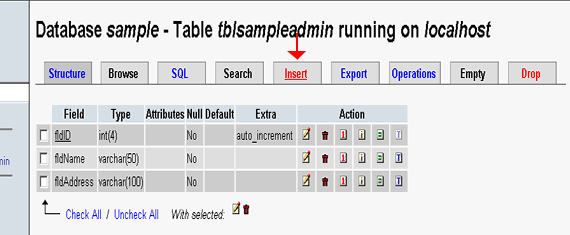
Figure showing MySQL Database in PHPMyAdmin interface.Next step is to enter the values for each fields and click the 'Go' button to insert the record into the table.
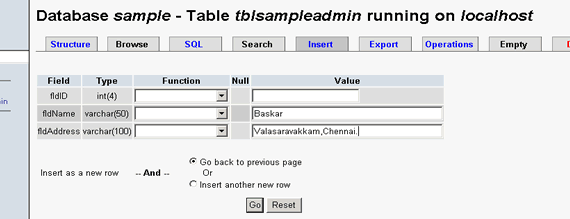
Figure showing PHPMyAdmin interface for Insert operation.The screen after successful insertion is shown as below, now click the 'Browse' button to view the list of records in the table.
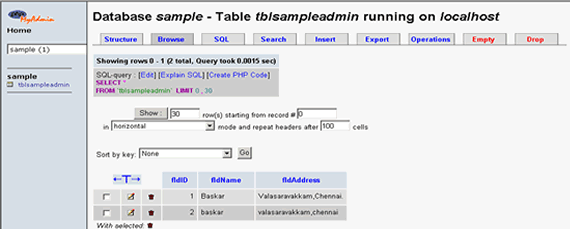
Figure showing PHPMyAdmin interface for successful insert.-
To edit a particular record use the edit button, make the necessary changes to the selected record and then click the 'Go' button to save the changes to the database.
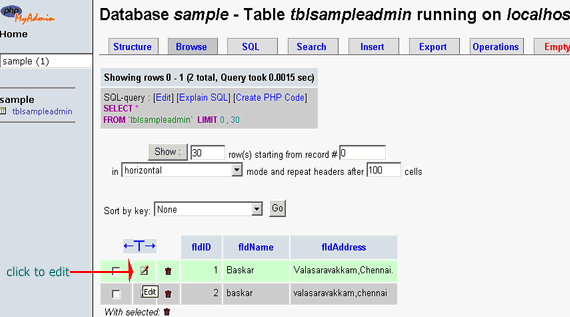
Figure showing PHPMyAdmin interface for Edit operation. - To Delete a particular record, first select the record and click the 'Delete' button. To delete more than one record, use the checkbox to select them and then click the 'Delete' button.
Deletion of a single record:
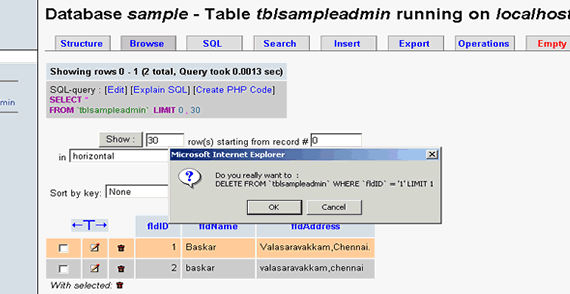
Figure showing PHPMyAdmin interface for Delete operation
Deletion of a list of selected records (for more than one record):
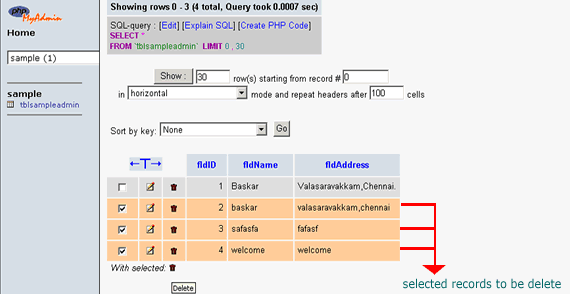
Figure showing PHPMyAdmin interface for Multiple record Deletion operation
Confirmation of deletion:
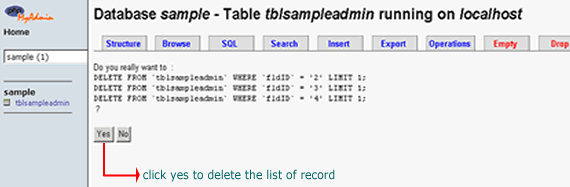
Figure showing PHPMyAdmin interface for confirmation of deletion
That's it you've learnt how to perform various operations like insert, edit and delete in MySQL using PHPMyAdmin.