Image Mapping
How to create image maps with Dreamweaver
An image map is basically used for placing multiple links on a single image. For example you have a medical site, where a photo of the human body should have links to different pages when different parts of the body are clicked.
Prerequisite Knowledge
This Image Maps tutorial teaches you how to create image maps and thus assumes you are familiar with some design software, even if you are new to Adobe Dreamweaver. However be assured that our detailed instructions can be followed by even a total novice.
You Are Here ::: Home >> Free Tutorials >> Dreamweaver Tutorials >> Image maps
An image map is an image that has been divided into regions or hotspots. Create a hotspot area, and then define a link that opens when a user clicks the hotspot area. You can create multiple hotspot areas, but they are part of the same image map and you can easily edit the hotspots which you create in an image map. You can move a hotspot area, resize hotspots, or move a hotspot forward or back in layer. You can also copy an image with hotspots from one document to another. For this follow these steps:
- Insert your image into your page using Insert > Image.
- Now select the image with the Properties panel open.
- You will find in the bottom left corner of the panel the word Map with a text box and 3 blue icons under it. See the image below that will show how the map will appear:
- Give your image map an appropriate name in the text box.
- Now click on either of the blue icons which are hotspots drawing tools (Rectangular, Oval and Polygon hotspot tools). Hotspots are like links only difference is that they have location co-ordinates on the image.
- Now draw your hotspot area which on clicking should go to a particular link. Give the link details (link, target and alt tag).
- After you have drawn and defined all your hotspots, just click on the black arrow icon below the map name to get back the arrow cursor.
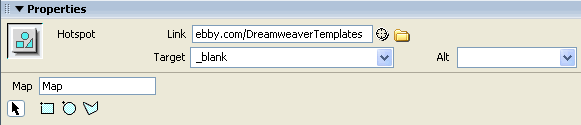
That's it your image map is ready!
Software Required
Adobe Dreamweaver (Macromedia Dreamweaver prior to version 8). Please check out the compatible versions listed in the box below. Since this tutorial series covers the core functions of Dreamweaver to create image maps using Dreamweaver, mostly any version of these software should be fine.
Compatible Versions of Dreamweaver for this Tutorial
 Dreamweaver 4-8 | Dreamweaver CS3 | Dreamweaver CS4/CS5/CS6
Note: The instructions in this tutorial are same across all Dreamweaver versions listed above; Screenshot images (if any) may differ. Recommended Version: Dreamweaver CS6