Flash Import External Data Tutorial
How to import data from external sources into Flash
You might have wondered how a flash (.SWF) file obtains data from remote files. Through this Flash tutorial you will learn how to obtain data from external sources.
You Are Here ::: Home >> Free Tutorials >> Flash Tutorials >> Import External DataFlash can obtain external data from:
The values from these files have to be sent in format understandable by Flash. Flash Actionscript has an XML object to obtain data from XML files. The Flash player loads variables and their values from any of the remote file into its memory and then uses them as required.
How does Flash get external values?
Variable-Value Format
- Flash needs to receive the variables and values in the format below:
For a single variable: - Similarly for multiple variables it needs the same format, but separated by "&" in between them:
&variable1=value1
&variable2=value2&variable3=value3&variable4=value
variable1=value1
Note: The variable name should be understandable by you as to what it represents and shouldn't include spaces. Spaces should not be present between the '&', the variable name and the '=' sign. The values can have spaces.
A. Loading Variables from External Text File into Flash
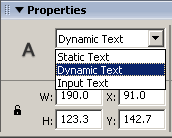 Flash can call any remote text file by using a command in the Actions Panel called loadVariables ('Load/Unload Movie' in Flash 5).
 - Select its 'Load Variables into location' option and give the URL of your file in the URL box provided. The command will now look like:
- The values of the variables can be accessed from Flash with the help of the variable names specified in the external text file into any Dynamic text field in Flash.
- Let the variable name of the Dynamic text field in Flash be called as 'dyn_txt'. The value of the variable can be obtained as follows:
dyn_txt = variable1;
- Obtaining variables and their values into the Flash interface from the text file should be done in a special format as mentioned below. This format can be remembered easily as the Variable-Value format
loadVariables("your_file_URL.txt","");
Flash - 5
Load Variables ("your_file_URL.txt","");
Variable-Value Format (*.txt file)
- Flash needs to receive the variables and values in the format below:
For a single variable: - Similarly for multiple variables it needs the same format, but separated by "&" in between them:
&variable1=value1
&variable2=value2&variable3=value3&variable4=value
variable1=value1
B. Loading Variables from ASP/PHP Files into Flash
- The ASP page interacts with the Database and gets the required data and sends the retrieved data to Flash. Read more..
- Flash can call any remote text file by using a command in the Actions Panel called loadVariables ('Load/Unload Movie').
- Select its 'Load Variables into location' option and give the URL of your file in the URL box provided. The command will now look like:
- The values of the variables can be accessed from Flash with the help of the variable names specified in the external text file into any Dynamic text field in Flash.
loadVariables("your_file_URL.asp","");
(or)
loadVariables("your_file_URL.php","");
Flash - 5
Load Variables ("your_file_URL.asp","");
(or)
Load Variables ("your_file_URL.php","");
Variable-Value Format (*.asp file)
Flash needs to receive the variables and values in a similar format form the ASP file as shown below:
response.write "&name=" & fldName & "&email=" & fldEmail & "&mess=" & fldMess & "&date=" & fldDate
Variable-Value Format (*.php file)
Flash needs to receive the variables and values in a similar format form the PHP file as shown below:
echo "&name=$fldName&email=$fldEmail&mess=$fldMess&date=$fldDate
C. Loading Data from XML Files into Flash
- Flash Actionscript object XML can be used to load the XML document returned by the server into Flash.
- We first create an instance of the XML object and then load the XML document using the load command as shown below:
- Create 4 Dynamic textboxes with variable names - xmldoc, node_name, topic, author and write the following code in the 3rd frame as given below:
- The 'loaded' method is used to check for loading of the XML document, if it is loaded the values are retrieved from the XML document through the methods of XML object.
- The firstChild method is used to reference the first child of the parent node, nodeName is used to retrieve the name of the XML Node.
- The attributes if present, can be displayed using the attributes.attribute_name by specifying each attribute_name. Thus the output can be displayed as shown below: (Click the Load XML Data Button for a Live Demo)
getxmldata=new XML();
getxmldata.load("xmldata.xml","");
if (getxmldata.loaded){
var p = getxmldata.firstChild;
xmldoc = getxmldata.childNodes;
node_name=p.nodeName;
topic=p.attributes.topic;
author=p.attributes.author;
}
xmldata.xml file
The XML code used in this tutorial is as follows:
<TUTORIAL TOPIC="Loading XML Data in Flash" AUTHOR="SmartWebby.com" />
Software Required
Compatible Versions of Flash for this Tutorial


Flash CS5 Professional | Flash CS4 Professional
Note: For uses of lower versions of Flash some visual interface images would differ.
Recommended Version: Adobe Flash CS5 Professional