Photo Blend
How to create blend mode with Fireworks CS4+
In this tutorial you are going to learn how to use blend mode to an image using Adobe Fireworks CS4+. Adobe Fireworks CS4+ has several blending mode help you to get the look you want in a photograph. The blending mode allow you to create multiple images. Blending mode also include a dimension of control to the opacity of objects and images.
Prerequisite Knowledge
This tutorial teaches you how to create a blend mode using Fireworks and thus assumes you are familiar with some design software, even if you are new to Adobe Fireworks. However be assured that our detailed instructions can be followed by even a total novice.
You Are Here ::: Home >> Free Tutorials >> Adobe Fireworks CS4+ Tutorials >> Blend Mode Effect
Blending mode examples with Adobe Fireworks CS4+
Here are examples of some of the blending mode in Adobe Fireworks CS4+.
|
|
|
|
|
|
|
|
|









- The Blend Mode is displayed on the right side of the Properties Window. See the image below that will show where the Blend mode option will appear.
- For Lighten and Overlay the backgrounds will differ. Since the image will not display clearly in the white background so we have used two different backgrounds.
- See how we have used this Multiply blend mode image in our CSS website design tutorial.

|
|
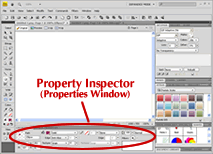
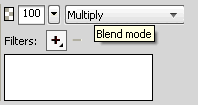
Properties & Blend Mode Settings: Fireworks CS4+ Screenshot
Software Required
Adobe Fireworks CS4+. If you are using the CS3 and below version please read Blend Mode Effect with Fireworks.
Compatible Versions of Adobe Fireworks for this Tutorial
 Fireworks CS4 | Fireworks CS5 | Fireworks CS6
Adobe Fireworks CS3 & below users: For lower versions of Fireworks, some features, steps and screenshot images may differ. Please read the CS3 & Below version of this free web design tutorial - Blend Mode Effect with Fireworks.
Recommended Version: Fireworks CS6