Flash Button Symbols
How to create a button symbol in Flash
Button symbols are used for timeline navigation. The button symbols add interactivity to the movie and respond to mouse clicks, key press or rollovers/rollout and other actions. You can define the graphics associated with various button states (Up/Over/Down/Hit), and then assign actions to the instance of a button. There are 4 frames in their timeline -one each for the up, over and down states, and one to define the hit area of the button.
You Are Here ::: Home >> Free Tutorials >> Flash Tutorials >> Flash Button Symbols
Please carry out the following steps in Flash to create button symbols.
- First create/import the object(s) to be converted into a button. Import bitmaps onto the stage using Ctrl+R.
- Select the object(s) and then press F8 (or Modify >> Convert to Symbol).
- Select the Button Behavior for the symbol and name the symbol say, 'btn_home'.
- Double-click the instance of 'btn_home' on the stage to switch to its symbol-editing mode. The Timeline header changes to display four consecutive frames labeled Up, Over, Down, and Hit as shown below.
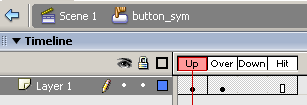
Fig: Symbol-editing Mode of completed flash button 'btn_home' - The first frame displays the drawn vector/plain text used for creating this button, now insert a Key frame (F6) in the frame labeled Over (Flash automatically duplicates the contents of the Up frame).
- Now change the color of the object in the Over frame to create a rollover effect in the button.
- Insert frames (F5) for the Down frame and the Hit frame (only defines the area of the button that responds to user action and is not visible at runtime).
- Save your work and test the Movie (Ctrl + Enter). That's it your simple button is ready!
Flash Symbols
- Overview of Flash Symbols
- Creating Graphic Symbols
- Creating Button Symbols
- Creating Movie-clip Symbols
Software Required
Compatible Versions of Flash for this Tutorial


Flash CS5 Professional | Flash CS4 Professional
Note: For uses of lower versions of Flash some visual interface images would differ.
Recommended Version: Adobe Flash CS5 Professional