Website Background & Navigation Design
Designing the web-site's background and navigation with Fireworks
 To create your own website with Dreamweaver and Fireworks you need to first create your web page design using Fireworks. As part of our free CSS website design guide this tutorial teaches you how to design the smart website layout on your right. The steps involved in doing this are:
- Designing the website's header and footer
- Designing the website's background and navigation
- Placing photos and content into the website's design
We have completed Step A in the previous chapter and now move to Step B of the layout design process where we will show you how to design the website's background and navigation.
You Are Here ::: Home >> Free Tutorials >> Website Design with Dreamweaver & Fireworks >> Website Layout Design
Step 2B: Design the website's Background & Navigation with Fireworks
Before creating the background and navigation of the Fireworks website layout created so far, please double click and rename the layer containing the previously designed header and footer (named as "layer 1" by default) to "header and footer" and then lock the layer.Designing the web-site Background
Create a new layer by clicking the Option on the right side of the Layers Panel and rename the layer as background and navigation. Now click and drag the background and navigation layer below the header and footer layer. See the below image that shows how the layers should now appear.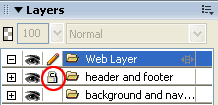
Lets now learn how to create the multi-colored background as shown in the sample design.
- First you need to draw a rectangle with the dimensions of width: 142 pixels and height: 508 pixels using the Rectangle Tool
 . Select the rectangle and set its Fill Color as #CC3366 and Stroke Color as none. Now, place your rectangle on the left side of the Document Window.
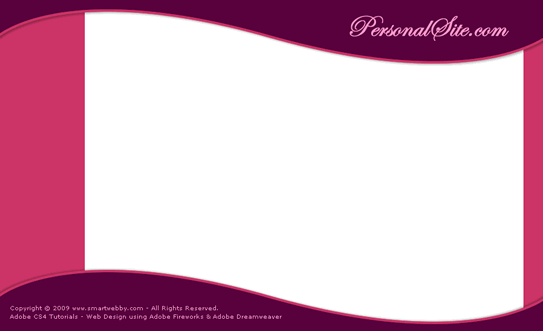
 - Duplicate the first rectangle (copy-paste or Alt+down arrow) OR draw a second rectangle with the dimensions of width: 32 pixels and height: 508 pixels using the Rectangle Tool . Select the second rectangle and set its Fill Color as #CC3366 and Stroke Color as none. Now, place your rectangle on the right side of the Document Window. The image below shows how the website layout should look like now:
- Next you need to similarly place another two rectangles in between the first two rectangles to complete our website background design using Fireworks.
- Draw a third rectangle with the dimensions of width: 463 pixels and height: 508 pixels using the Rectangle Tool .
- Select the rectangle, and set its Fill Color to #DA89BE and Stroke Color as none. Now, place your rectangle on the left side of the Document Window (Set the XY position to about X: 169 and Y: 16). Note: The W, H, X and Y values can be viewed in the Properties Inspector (Window >> Properties).
- Draw a fourth rectangle with the dimensions of width: 169 pixels and height: 508 pixels using the Rectangle Tool . Select the rectangle, choose Fill Color as #F7BBE3 and Stroke Color as none. Now, place your rectangle on the left side of the third rectangle as shown below (The XY position should be about X: 593 and Y: 66). The image below shows the resulting layout:
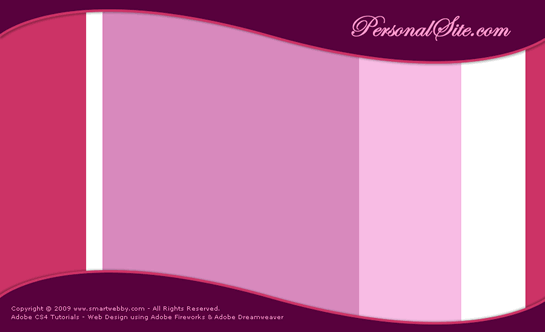
You have now completed the background of the website design in Fireworks.
Designing the web-site Navigation
- In our sample design the first vertical bar on the left will be used to place the website's navigation links. We are going to use five links such as Home, My Profile, Photo Gallery, Guest Book and Contact Info as the website's navigation links.
- To create the links, first draw a rectangle with the dimensions of width: 114 pixels and height: 24 pixels. Select the rectangle and set its Fill Color as none and Stroke Color as #B32D58. Now duplicate (Alt + down arrow) the rectangle four times and arrange the rectangles one by one.
- Take the Text Tool
 , choose Font - Trebuchet MS, Font Size - 14, Color - #FF9999, Font Weight - bold, Anti-aliasing level - Smooth Anti-Alias and write the text of the links. See the illustration below that shows how the links are arranged.
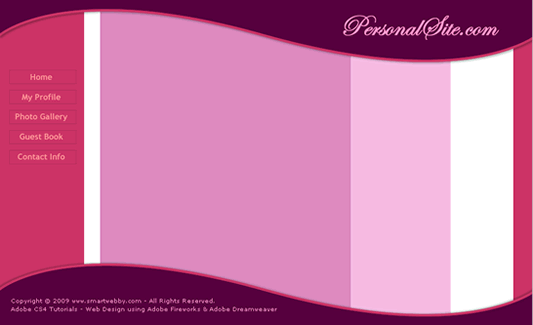
Great! You have now completed the background and navigation design of the website in Fireworks. The next step is to Place photos and content into the website's design.
Design the website's header and footer || Continue to Step 2c: Placing photos & content into the website's design
This CSS website design guide teaches layout design with Fireworks and CSS/XHTML website conversion with Dreamweaver. Learn CSS Web Design by following these simple steps:
- Introduction: How to make a Website
- Layout Design: Designing the website's layout with Fireworks
- Export Images: Slicing and Exporting the website images with Fireworks
- Dreamweaver Site: Setting up the website in Dreamweaver
- CSS Tutorial: CSS and XHTML website programming with Dreamweaver
- CSS Styles: Formatting the web pages using CSS style sheets in Dreamweaver
Software Required
Compatible Versions of Fireworks for this Tutorial

 Fireworks 4-8 | Fireworks CS3
Note: The instructions in this tutorial are same across all Fireworks versions listed above; Screenshot images (if any) may differ. Adobe CS4+ users: Read the CS4+ version of this web design tutorial series - Design a Website. Recommended Version: Fireworks CS6