Fireworks Web Design Tutorial
Learn how to design you very own web site using Fireworks MX onwards
Compatible Versions of Adobe Fireworks for this Tutorial
 Fireworks 4-8 | Fireworks CS3
Adobe Fireworks CS4 & above users: If you are using Fireworks CS4+ please note that some features, steps and screenshot images may differ for the above tutorial. Recommended Version: Fireworks CS6
Please note: This page bridges you to our recently released Fireworks Web Design Tutorials as this page's content has been overhauled to give way to our new CSS Web Design Guide. A short synopsis of what the new guide teaches follows.
Learn how to easily design a professional website using Adobe Fireworks and then build it into a CSS website using Adobe Dreamweaver. The cool CSS website we are going to create step-by-step is shown below:
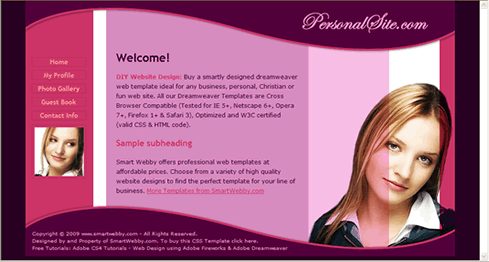
This CSS website design guide teaches layout design with Fireworks and CSS/XHTML website conversion with Dreamweaver. Learn CSS Web Design by following these simple steps:
- Introduction: How to make a Website
- Layout Design: Designing the website's layout with Fireworks
- Export Images: Slicing and Exporting the website images with Fireworks
- Dreamweaver Site: Setting up the website in Dreamweaver
- CSS Tutorial: CSS and XHTML website programming with Dreamweaver
- CSS Styles: Formatting the web pages using CSS style sheets in Dreamweaver