Basics of Flash and ASP
Interaction between Flash, ASP and the Database
In this step of our Flash and ASP integration guide we are going to see how Flash interacts with the database via an ASP Page. The same cycle is followed for both sending data to and receiving data from the database. This is shown diagrammatically below:
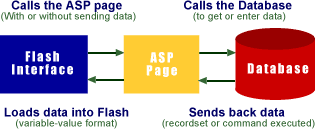
Though this seems like a round about way of getting data (and time consuming) you will be surprised to see what wonders can be achieved with a little optimization and care. Note : All the three interactive Flash products done in Flash and ASP on our site have super-fast loading times. Infact the SmartPoll loads faster than the HTML page for a 56K modem ;-)
Role played by Flash
Simply put Flash in our context is just used to create the Interface which:
- Calls the ASP page to retrieve data from the database or insert data into it.
- Displays and/or manipulates the data sent to it from the database via an ASP Page
- Collects and sends data from the user to the database via an ASP Page
You might be wondering how a flash (.SwF) file obtains data. You must know that to be able to view a flash file your browser needs to have a plug-in called 'Flash Player' installed. The flash player loads variables and their values (when requested to) from a remote file (in our case the ASP file) into its memory
Loading variables from a remote file into Flash
Flash can call a remote file by using a command in the Action tab called 'Load/Unload Movie'. Select its 'Load Variables into location' option and give the URL of your file in the URL box provided. The command will now look like:Load Variables ("your_file_URL.asp","")
The above command gets data from your file without sending any data of its own to it. If you need to send some data to your ASP page from the Flash interface, then in addition to the above command just select the 'Send using POST' option from the drop down menu called 'Variables'. Thus the command looks like:
Load Variables ("your_file_URL.asp","", vars=POST)
The format in which the data should be supplied to Flash is
highly crucial to the concept of Flash 'n' ASP. Let us call this
special structure of supplying data as the Variable-Value
format that is explained in the ASP section below. When data is
sent in this format the Flash player takes each variable with
its value and supplies it to the .SwF file. Similarly, when it
sends variables to a remote file, they will be in this format
and will have to be derived.
For your information please note that the remote file can be a
static HTML or TEXT file too instead of an ASP page. The data
just has to be in the Variable-Value form as explained above.
Role played by ASP
Active Server Pages (ASP) - Is a technology that provides a framework for building dynamic HTML pages. Simply put ASP in our context is used as the Mediator between the database and the Flash interface which:
- Retrieves data from the database and outputs it in the Variable-Value format with or without changing it.
- Takes data sent from the Flash interface and stores it in the database with or without changing it.
- From data sent from the Flash interface it carries out operations like cookie setting, validation, etc.
- Sends back results of its operations to the Flash interface.
Sending of variables and their values to the Flash interface by the ASP file should be done in a special format as mentioned above. This format can be remembered easily as the Variable-Value format, otherwise known as the URL-Encoded format in ASP.
Variable-Value Format
Flash needs to receive the variables and values in the format below:For a single variable:
variable1=value1
And thus for multiple variables it needs the same format separated by a "&" in between:
variable1=value1&variable2=value2&variable3=value3&variable4=value4
The Database
We will be using a Microsoft Access 2000 Database to store our form data. However for the web since speed is very crucial we recommend the use of a SQL Server or an Oracle Database.
That covers the bare basics of Flash and ASP!
Continue to Step 3: Preparing the Stage
This tutorial covers the usage of ASP and Flash to bring about Flash dynamic data display and manipulation i.e. interactivity into Flash:
- Flash and ASP Introduction
- Basics of Flash and ASP
- Preparing the Stage
- Sending Data from your Flash form to the database
- Getting Data from the database into your Flash form
- Flash preloader that waits for the data to load
- Validation of fields in Flash forms using JScript and VBScript