Design Ideas
Design ideas and tips for Web Design
In this article we present a few web design ideas and concepts that we hope would help you to build a better website, or increase your understanding about web design. If you are a beginner-to-intermediate level designer we suggest that you read our articles on Design Concepts (for building effective websites) and Design Basics (web design guidelines and myths busted) first.
You Are Here ::: Home >> Free Tutorials >> Fireworks Tutorials >> Web Design Ideas
The idea behind Website Design
Without hindering a website's usability (simple and quick access to information, services or products), a web designer's ultimate aim for a website's design is to reach the optimal balance between its attractiveness (targeted look-and-feel with necessary design effects), load time considerations (optimizing design elements for reasonable web page size) and user friendliness (easy-to-use navigation and user interactions plus well laid-out easily readable content) - without entirely compromising on either of them. On the programming front, no compromise must be made in building a well coded and error free website that ensures a uniform user experience - web standards compliant (W3C valid XHTML/HTML and CSS), accessible and cross browser compatible.
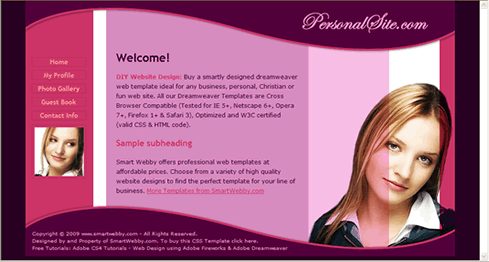
Design a Website: Learn how to easily design and build a professional website. Create step-by-step the cool website shown above.
Clean Consistent Layout and Navigation
Give importance to your website's layout and navigation. A clean consistent layout that uses a lot of white space with neat navigation will enhance your site. Try to keep the focus on your content. That is why we recommend using dreamweaver templates for your site - all pages or a group of pages have one basic design and only the content varies - this way even if your site is a little distracting due to necessary effects, your design is noted once (hopefully with a appreciative eye :-) and then the visitor focused on the content automatically. Make sure you have read our important articles on Design Concepts, more Design Ideas (includes guidelines, myths busted and inspiration) and Web Design Tips before you start designing your site.
If you have too many links then you should use drop-down menus or flyouts for your main sections otherwise your visitor can get overwhelmed. If you have Fireworks or Dreamweaver then they can automatically generate the drop-down menus code - one of their most popular in-built "Behaviors".
 |
|







Correct use of effects for an Impressive Website
Some design elements greatly enhance the look and user experience of your web site and create a positive first impression. Some of these effects have been described.
Simple CSS Effects
Use CSS Styles to enhance your site's look, accessibility and reduce file size. Another main advantage CSS has is reusability. The single most important skill you can learn today to become a quality web designer is CSS programming! Even if you are not an expert at CSS you can learn to use the following simple CSS Effects to enhance your website:
- Cool Text Effects using CSS Styles: Text Links Rollover, Text Case Setting, Text Spacing, Line-through Effect
- Bullets in HTML or Dreamweaver: Using CSS Styles with bullets (shapes, decimal, roman-numerals, images, etc.)
- Links without Underline: Use CSS Styles to display links without the appearance of the underline.
Simple Javascript or JQuery Effects
For example, when using image navigational elements, they can be enhanced by using some simple javascript effects:
- Rollover Buttons & Images: Here, a button or image changes itself on rolling over it (onMouseOver event) and reverts back to the original image on rolling out of the web object (onMouseOut event).
- Rollover Swap Images: Here, a group of web objects [web object - a slice, hotspot, or button] trigger the change in the display of another graphic on rolling over them (onMouseOver event) and reverts back to the original image on rolling out of the web object (onMouseOut event).
Graphic and Photo Effects
Most impressive websites designs are created by the use of various graphic and photo effects. What you need to become an expert at is, how to use these effects in the correct amount and not over do it. We recommend the use of simple, muted effects that don't irritate the eye.
Check out the following popular photo and graphic design effects tutorials from smartwebby:





Read our immensely popular Graphic Design Ideas article for more graphic and photo effects.
Wow your users with Interactivity
Websites with interactive applications that work to greatly enhance a website's user experience are the in thing today. You can use either AJAX or Flash (two most popular modes of interactivity on the web) for this or a combination of both (like used in Google Analytics).
AJAX (asynchronous JavaScript and XML), is basically creation of applications that interact with the server without leaving the displayed browser page. This drastically reduces bandwidth usage and load time. Sections of pages can also be reloaded individually.
Flash is very useful to add great looking yet small sized interactivity to your site. 95% of the world's browsers have the Flash Player plug-in, so you don't have to think about compatibility as long as your movie can be played by lower versions of the Flash Player. Animation capabilities combined with interactivity makes Flash cool. Try having both AJAX/HTML and Flash versions of the application to accommodate non-flash browsers.
Interactive Web Applications: To make your web site sticky you can add a few simple interactive web applications like site polls, surveys, a guest book, an event calendar, newsletter sign-up, etc. There are many applications on the net but you need to choose them carefully if you do a lot of online business. You can check out our some of our Flash products, that will bring your site to life:
Related Links :: Design Concepts | Design Basics | Web Design Tips
Design a Website | Website Header | Website Background
Website Navigation | Design Ideas