Ripple Effect in Flash - Alpha Tweening
How to create a smart alpha ripple effect by combining basic tweens
To further understand why complicated animations are just a combination of basic animations, try the following ripple effect in Flash.
You Are Here ::: Home >> Free Tutorials >> Flash Tutorials >> Advanced Alpha Tweening - Ripple Effect
Follow the steps given below:
- Carry out the zooming effect steps.
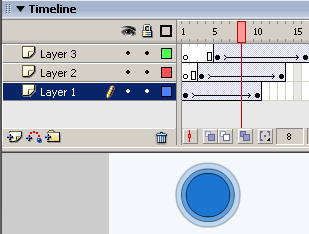
- Copy frames 1 to 10 -> To do this click frame 1, press Shift key and click frame 10 (the frames will be heighlighted), now press Ctrl+Alt+C to copy the frames.
- Add a new layer, click the 4th frame on the timeline and paste the copied frames (press Ctrl+Alt+V).
- Add another new layer, click the 8th frame on the timeline and paste the copied frames (press Ctrl+Alt+V).
- Repeat the above step leaving 4 frames more than the previous layer for as many layers as desired.
- Save your work and test the Movie (Ctrl + Enter). That's it, your cool ripple effect is ready!
Software Required
Compatible Versions of Flash for this Tutorial


Flash CS5 Professional | Flash CS4 Professional
Note: For uses of lower versions of Flash some visual interface images would differ.
Recommended Version: Adobe Flash CS5 Professional
In the following Flash tutorials you'll learn how to create cool flash effects using simple techniques like tweening, masking, etc.:
- Basic Effects : Fade-in Fade-out Effect, Zooming Effect and Alpha Ripple Effect
- Photo Effects : Simple Photo Masking, Motion Photo Masking and Smooth Fade Photo Masking
- Special Effects : Outline Effect, Shape Hint Flash Effect and Sinewave Background Effect
- Text Effects : Cool Text Effects